Data analysis
練習專案四:找出章魚里 2
環境設定
  建立新環境
  (base) conda create --name taiwan_presidential_election_2024 python=3.12

  進入新建立環境
  (base) conda activate taiwan_presidential_election_2024

  安裝模組
  (taiwan_presidential_election_2024) conda install pandas
  (taiwan_presidential_election_2024) conda install openpyxl
  (taiwan_presidential_election_2024) pip install gradio
數據準備
數據來源
- 中選會選舉及公投資料庫:2024 ー 第16任總統副總統選舉
- 下載各項統計表 -> 各投票所得票明細及概況(excel檔,ZIP壓縮)
數據結構
原始資料共 26 個檔案,皆以 寬表格 (wide format) 儲存,為了方便後續分析,我將資料轉換為 長表格 (long format),並進一步進行 資料庫正規化(Normalization)。
正規化的主要意義在於:減少重複、避免異常、方便維護與擴展、提高查詢效率。
-
原始資料 (寬表格)
- 資料可以分為三個部分 欄位名稱、有效資料、無效資料。
- 綠色:欄位名稱(columns),部分欄位因合併表格造成順序混亂,需要整理。
- 藍色:有效資料欄位,需進行空值填補並移除總計欄位。
- 紅色:無效資料,可直接移除。
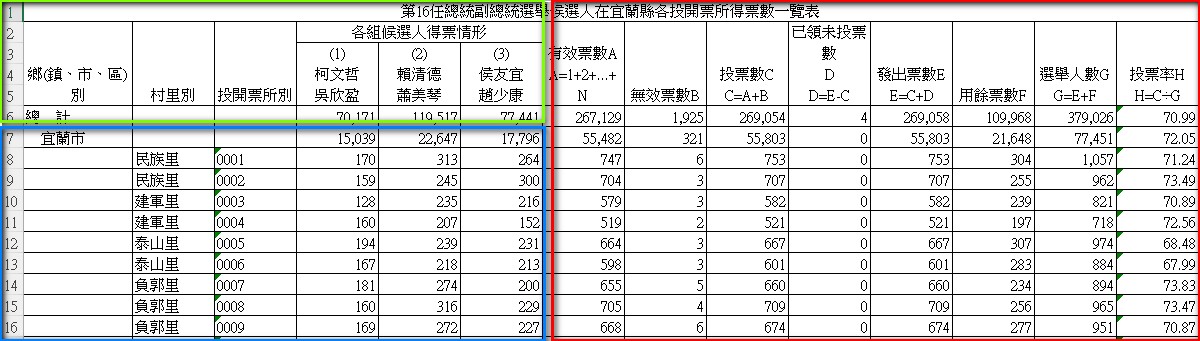
- 資料可以分為三個部分 欄位名稱、有效資料、無效資料。
-
資料庫正規化(Normalization):
-
candidates
- candidate_id:參選人ID
- candidate:參選人名
-
polling_places
- polling_place_id:投票所ID
- county:縣市
- town:鄉、區(清理多餘空白,如 \u3000中寮鄉)
- village:村、鄰、里
- polling_place:投票所(同一里可能有多個投票所,因此需保留)
-
votes
- polling_place_id:投票所ID
- candidate_id:參選人ID
- votes:得票數
-
votes_by_village(檢視表,用於快速整合)
- county
- town
- village
- candidate
- candidate_id
- sum_votes(總得票數)
-
數據導入
-
Step 1:載入與整理原始資料。
def tidy_county_dataframe(file_path, county_name):
  # 單一文件處理
  county_file_path = f'{file_path}總統-A05-4-候選人得票數一覽表-各投開票所({county_name}).xlsx'
  df = pd.read_excel(county_file_path)
  # 移除多餘列
  df = df.iloc[:,:6]
  # 刪除多於欄位
  df = df.drop([2,3,4])
  # 補齊縣市資料
  df.iloc[:,0] = df.iloc[:,0].ffill()
  # 修改欄位名稱
  columns = ['town', 'village', 'polling_place']  + df.iloc[1,3:].to_list()
  df.columns = columns
  # 刪除 nan 欄位(縣市統計(town)、前兩列資料)
  df = df.dropna().reset_index(drop=True)
  # 新增縣市欄位
  df['county'] = county_name
  # 將投票所欄位轉為整數型態
  df['polling_place'] = df['polling_place'].astype(int)
  # 寬資料表 轉 長資料表
  df = pd.melt(df, id_vars=['county', 'town', 'village', 'polling_place'], var_name="candidate_info", value_name="votes")
  return df
-
Step 2:讀取並合併所有資料。
def concat_country_dataframe(file_path):
  # 讀取文件名稱
  polling_county = os.listdir(file_path)

  # 擷取縣市資料
  county_name = []
  for i in polling_county:
      if '.xlsx' in i:
          county_name += [re.split('\\(|\\)', i)[1]]

  # 合併資料
  country_data = pd.DataFrame()
  for c in county_name:
      county_data = tidy_county_dataframe(file_path, c)
      country_data = pd.concat([country_data, county_data])
  # 分割 候選人編號(candidate_id) 資料
  country_data['candidate_id'] = country_data['candidate_info'].map(lambda i: re.split("\\(|\\)",i)[1])
  # 分割 候選人名稱(candidate) 資料
  country_data['candidate'] = country_data['candidate_info'].map(lambda i: re.split(r"\n|\(|\)",i)[3] + "/" + re.split(r"\n|\(|\)",i)[4])

  # 清除多餘空白 '\u3000中寮鄉'
  country_data['town'] = country_data['town'].str.strip()
  return country_data.drop(columns='candidate_info')
-
Step 3:資料庫正規化。
- candidates
# 建立 candidates (candidate_id, candidate)
candidates = country_data[['candidate_id', 'candidate']].drop_duplicates().reset_index(drop=True).copy()
- polling_places
# 建立 polling_places (polling_place_id, county, town, village, polling_place)

# 移除重複資料
polling_places = country_data[['county', 'town', 'village', 'polling_place']].drop_duplicates().copy()

# 建立主 key(polling_place_id)
polling_places = polling_places.reset_index(drop=True).reset_index().rename(columns={'index':'polling_place_id'})
- votes
# 設定 merge 條件。
join = ['county', 'town', 'village', 'polling_place']

# 合併 polling_places 資料表。
votes = pd.merge(country_data, polling_places, left_on=join, right_on=join, how='left')

# 移除多於資料。
votes = votes[['polling_place_id', 'candidate_id', 'votes']]
- 建立SQLite
# 建立 SQL
connection = sqlite3.connect(f'{file_path}/{db_name}')

# 建立資表 (name=資料表名稱, con=檔案位置, index=是否載入 pd 排, if_exists="replace" 若同名檔案存在蓋)
candidates.to_sql(name='candidates', con=connection, index=False, if_exists="replace")
polling_places.to_sql(name='polling_places', con=connection, index=False, if_exists="replace")
votes.to_sql(name='votes', con=connection, index=False, if_exists="replace")
- votes_by_village
# 建立SQL指令
cur = connection.cursor()
# 檢查 votes_by_village 是否重複
drop_view_sql = """
drop view if exists votes_by_village
"""
# 建立 votes_by_village
create_view_sql = """
create view votes_by_village as
select pp.county,
    pp.town,
    pp.village,
    c.candidate_id,
    c.candidate,
    sum(v.votes) as sum_votes
from votes v
join polling_places pp
  on v.polling_place_id = pp.polling_place_id
join candidates c
  on v.candidate_id = c.candidate_id
group by pp.county,
      pp.town,
      pp.village,
      c.candidate_id
"""
cur.execute(drop_view_sql)
cur.execute(create_view_sql)
connection.close()